What is Session Replay? Key Benefits and Use Cases Explained
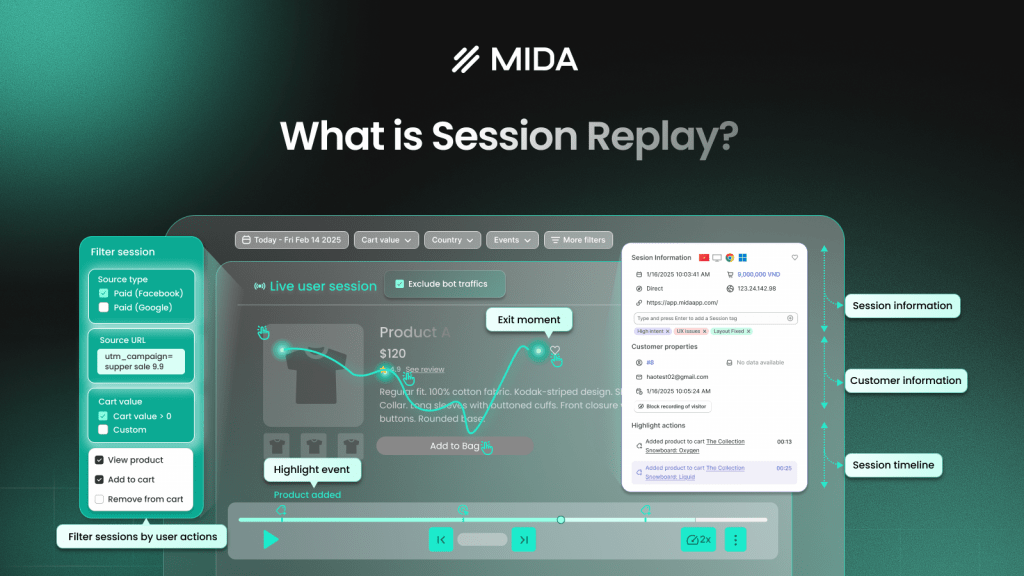
Session replay is a technology that records and visually reconstructs every interaction a visitor has on your website—clicks, scrolls, mouse movements, form inputs, and hesitations—so you can watch their experience like a video. Unlike traditional analytics that show you aggregate numbers, session replay reveals the individual story behind each visit, making it possible to see exactly where shoppers get confused, frustrated, or abandon their journey.
This guide covers how session replay technology works, the specific benefits it delivers for ecommerce and product teams, practical use cases across different roles, and how to evaluate session replay tools for your Shopify store.
What is session replay
Session replay is a technology that records and reconstructs user interactions on a website or app, letting teams watch real visitor sessions like a video. By capturing clicks, scrolls, mouse movements, form interactions, and hesitations, session replay tools provide actionable insights that help teams identify technical bugs, spot user frustration, and improve conversion rates.
Unlike traditional analytics that show aggregate numbers, session replay reveals the individual story behind each visit. You might watch a shopper navigate from your homepage to a product page, hesitate over the size selector, scroll past your reviews section, and then leave without adding anything to cart. That sequence tells you something a bounce rate never could.
How session replay technology works
Session replay doesn’t actually record video of your visitors’ screens. Instead, lightweight scripts capture the structure of your page and every interaction that happens on it, then reconstruct that experience during playback.
How session replay scripts capture user behavior
When a visitor lands on your site, a JavaScript snippet begins recording. Here’s what it captures:
- DOM reconstruction: The script takes snapshots of your page structure—HTML elements, CSS styles, and content—so it can rebuild exactly what the visitor saw.
- Event tracking: Every click, scroll, mouse movement, form input, and hover gets logged with precise coordinates and timing.
- Timestamp synchronization: All actions are sequenced so playback shows events in the exact order they occurred.
This approach keeps file sizes small and page performance fast. You’re not streaming video—you’re recording a blueprint that gets reassembled later.
Web session replay vs mobile session replay
Web session replay captures browser-based interactions across desktop and mobile browsers. Mobile session replay, on the other hand, records behavior within native iOS and Android apps, handling touch gestures and device orientation changes.
For Shopify merchants, web session replay covers the vast majority of customer journeys since most shopping happens in browsers.
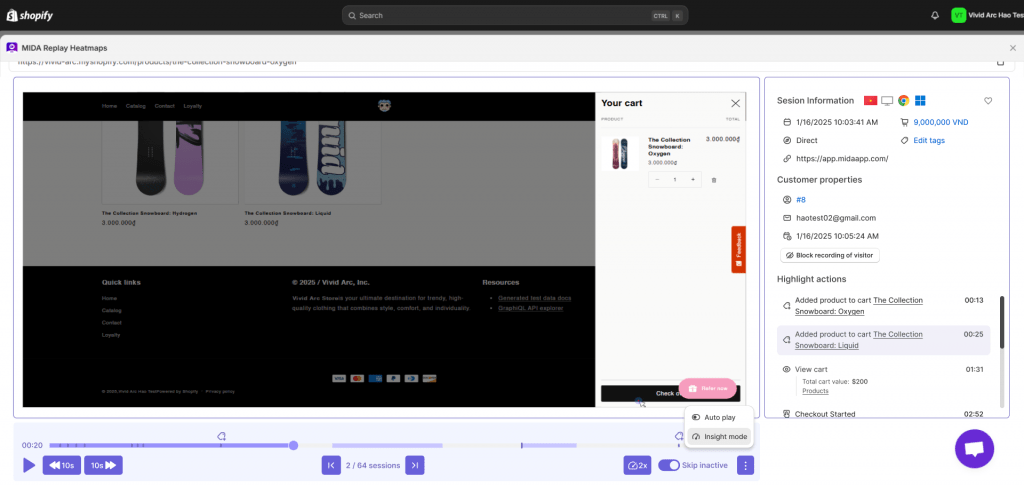
What a session recording shows you
When you watch a replay, you see everything the visitor did:
- Mouse movements and click patterns, including where they clicked and what they ignored
- Scroll depth and page navigation, showing how far down they read
- Form field interactions and hesitations
- Error states and rage clicks, highlighting moments of frustration
The best session replay tools enrich this visual data with context—traffic source, device type, cart value, and whether the visitor ultimately purchased or abandoned.
Key benefits of session replay
Session replay transforms abstract metrics into observable behavior. Instead of guessing why your conversion rate dropped, you can watch exactly what happened.
Connect user behavior to revenue outcomes
Generic analytics tools show you that 500 people visited your product page and 50 added to cart. Session replay shows you what the other 450 did—and more importantly, what stopped them.
With Shopify-native session replay tools like MIDA, you can filter recordings by cart value, purchase status, and checkout stage. This means you can compare sessions from customers who bought versus those who abandoned, looking for patterns that explain the difference.
Identify friction points and conversion blockers
Numbers tell you where drop-offs happen; session replays tell you why. You might discover that shoppers repeatedly click on an image expecting it to zoom, or that your shipping calculator throws an error on certain postal codes, or that mobile visitors can’t find your add-to-cart button without scrolling.
These friction points are invisible in traditional analytics. Watching real sessions surfaces them quickly, often within the first few recordings you review.
Debug issues faster with full context
When a customer reports that “checkout didn’t work,” your development team faces a frustrating guessing game—and 96% of customers never report bugs at all. Session replay eliminates that guesswork entirely.
Developers can watch exactly what the user experienced—which buttons they clicked, what error messages appeared, and what happened before the failure. This context dramatically reduces debugging time because there’s no trial and error involved in reproducing the bug.
Validate UX hypotheses with behavioral evidence
You might believe that customers aren’t seeing your product reviews because they’re below the fold. Or that your new navigation menu is confusing first-time visitors. Session replay provides the evidence to confirm or disprove these assumptions.
Instead of debating opinions in meetings, teams can point to actual recordings showing how real shoppers interact with specific elements.
Visualize the complete customer journey
Analytics tools show you page-by-page metrics, but session replay reveals the full path a visitor takes through your store—the detours, the backtracking, the moments of comparison shopping, and the final decision point.
This journey-level view often reveals unexpected patterns. Maybe customers who convert typically visit your FAQ page first. Maybe abandoned carts spike after visitors see your returns policy.
Session replay use cases
The benefits above translate into specific, practical applications across different teams and scenarios.
Reducing cart and checkout abandonment
Cart abandonment—averaging 70.19% globally—is the most expensive problem in ecommerce, and session replay is the most direct way to diagnose it. By watching sessions where shoppers added items but never completed purchase, you can identify exactly where they dropped off and why.
Common discoveries include unexpected shipping costs that appear late in checkout—extra costs drive 48% of cart abandonments—payment form fields that don’t validate correctly, or trust concerns that arise when security badges are missing.
Improving product page performance
Product pages are where purchase decisions happen, and small details matter enormously. Session replay shows you whether shoppers are engaging with your product images, reading your descriptions, scrolling to reviews, or clicking on size guides.
You might find that visitors on mobile never see your product benefits because they’re positioned below a large image gallery. Or that shoppers repeatedly click on a color swatch that doesn’t actually change the displayed image.
Troubleshooting user-reported bugs
When a customer contacts support saying “I couldn’t complete my order,” session replay lets you see exactly what happened. Support teams can pull up the specific session, watch the sequence of events, and understand the problem without lengthy back-and-forth.
Optimizing landing pages and campaigns
Marketers spend significant budget driving traffic to landing pages, but click-through rates only tell part of the story. Session replay shows what happens after visitors arrive.
You can filter sessions by traffic source or UTM campaign to see how paid traffic behaves differently from organic. Maybe visitors from a specific ad scroll quickly past your hero section because the messaging doesn’t match what they expected.
Enhancing customer support conversations
Support teams often struggle to understand what customers experienced before reaching out. When a customer says “the discount code didn’t work,” support can watch the session and see whether the code was entered correctly, whether an error message appeared, or whether the discount simply didn’t display properly.
Which teams benefit from user session replay tools
| Team | Primary Benefit |
| Product & UX | Identify usability issues and validate designs |
| Marketing & Growth | Understand campaign traffic behavior |
| Development & QA | Reproduce and debug issues faster |
| Customer Success | Gain context for support conversations |
| Ecommerce | Connect behavior to revenue metrics |
Product and UX teams
Designers and product managers use session replay to validate whether new features work as intended. Instead of waiting for A/B test results, they can watch early sessions and catch usability problems before they affect conversion at scale.
Marketing and growth teams
Marketers use session replay to understand the quality of traffic from different channels. High bounce rates from a campaign might indicate poor targeting—or they might indicate a landing page problem that session replay can diagnose.
Development and QA teams
Engineering teams use session replay for application monitoring with user session replay capabilities. When errors occur, they have full context for debugging without reproducing issues manually.
Customer success and support teams
Support teams reference session history to understand customer context before responding, reducing resolution time and improving the quality of support interactions.
Ecommerce and Shopify teams
For ecommerce teams specifically, session replay connects behavior to revenue. Shopify-native tools tie recordings directly to cart value, checkout events, and order outcomes—context that generic session replay tools can’t provide.
Session replay vs heatmaps
Both session replay and heatmaps visualize user behavior, but they answer different questions.
When to use session replays
Session replays excel at individual journey analysis. Use them when you want to understand the sequence of behavior, diagnose specific issues, or see exactly what one visitor experienced. They’re particularly valuable for debugging, investigating abandoned carts, and understanding complex multi-page journeys.
When to use heatmaps
Heatmaps show aggregate patterns across many visitors. Use them when you want to understand where most people click, how far most people scroll, or which page elements get the most attention. They’re ideal for comparing page versions and identifying ignored sections.
How session replays and heatmaps work together
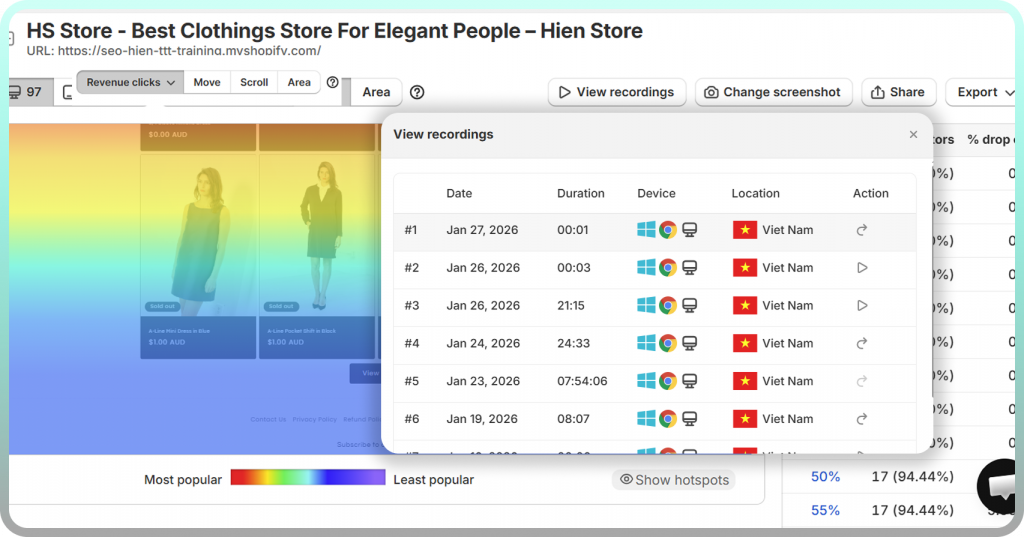
The most effective workflow combines both tools. Heatmaps identify problem areas—maybe a high concentration of rage clicks on a specific element, or a sharp drop-off in scroll depth before your call-to-action. Once you’ve spotted the pattern in a heatmap, you can drill into session replays to understand why it’s happening.
MIDA’s integration between heatmaps and session replay makes this workflow seamless: click on any heatmap hotspot and jump directly into recordings where that behavior occurred.
How to choose session replay software
Not all session replay tools are created equal. Here’s what to evaluate when comparing options.
Key features of session replay solutions for UX optimization
- Relevance scoring: Automatically prioritizes high-impact sessions so you’re not watching random traffic.
- Behavioral filters: Segment by actions like rage clicks, cart abandonment, or completed purchases.
- Playback controls: Skip idle time, adjust speed, and jump to specific events.
- Tagging and sharing: Collaborate with team members by marking and sharing important sessions.
Integration with analytics and existing tools
Session replay becomes more powerful when connected to your broader analytics stack. Look for tools that integrate with heatmaps, surveys, and analytics platforms so you can move seamlessly between quantitative data and qualitative observation.
For Shopify merchants, native integration matters significantly. Tools built specifically for Shopify can access checkout events, customer profiles, and order data that generic platforms miss.
Data privacy and security capabilities
Privacy is non-negotiable. Ensure your session replay software offers automatic masking of sensitive fields like passwords and payment information, consent management options, and clear data handling policies.
Scalability and support options
Consider data retention periods, session volume limits, and the quality of vendor support. As your store grows, you’ll want a platform that scales with your traffic without unexpected costs or performance degradation.
Privacy and compliance for session replay
Privacy concerns are legitimate, and addressing them properly is essential for responsible session replay implementation.
How user session replay addresses privacy concerns
Modern session replay tools include built-in protections by default. Sensitive form fields like passwords and credit card numbers are automatically masked, meaning they’re never captured or stored. You can also configure additional exclusions for specific page elements or entire pages.
GDPR and data protection considerations
If you serve customers in the EU, GDPR compliance requires informed consent for session recording. Most session replay tools integrate with consent management platforms, allowing you to start recording only after visitors accept cookies. Data storage location also matters for compliance—verify where your session replay provider stores data.
Common misconceptions about session replays
Several myths prevent teams from adopting session replay or using it effectively.
You need to watch every replay session
This is the biggest misconception. Modern user session replay tools use relevance scoring and filtering to surface the most valuable sessions automatically. You might watch 20-30 carefully selected recordings per week rather than hundreds of random ones.
Session replay invades user privacy
When implemented correctly, session replay captures behavior patterns without capturing sensitive personal information. Passwords are masked, payment details are excluded, and compliant tools follow privacy regulations.
Session replays replace quantitative analytics
Session replay complements analytics—it doesn’t replace them. Analytics tell you what happened at scale: conversion rates, bounce rates, funnel drop-offs. Session replay tells you why those numbers look the way they do.
Session replay for ecommerce and Shopify stores
Ecommerce has unique requirements that generic session replay tools often miss.
Ecommerce segmentation and revenue signals
Generic session replay shows you visitor behavior. Ecommerce-focused session replay connects that behavior to revenue outcomes. Look for tools that let you filter sessions by:
- Cart value: Focus on high-intent shoppers who added expensive items.
- Purchase status: Compare buyers versus abandoners to identify conversion patterns.
- Frustration signals: Surface sessions with rage clicks, error clicks, or hesitation patterns.
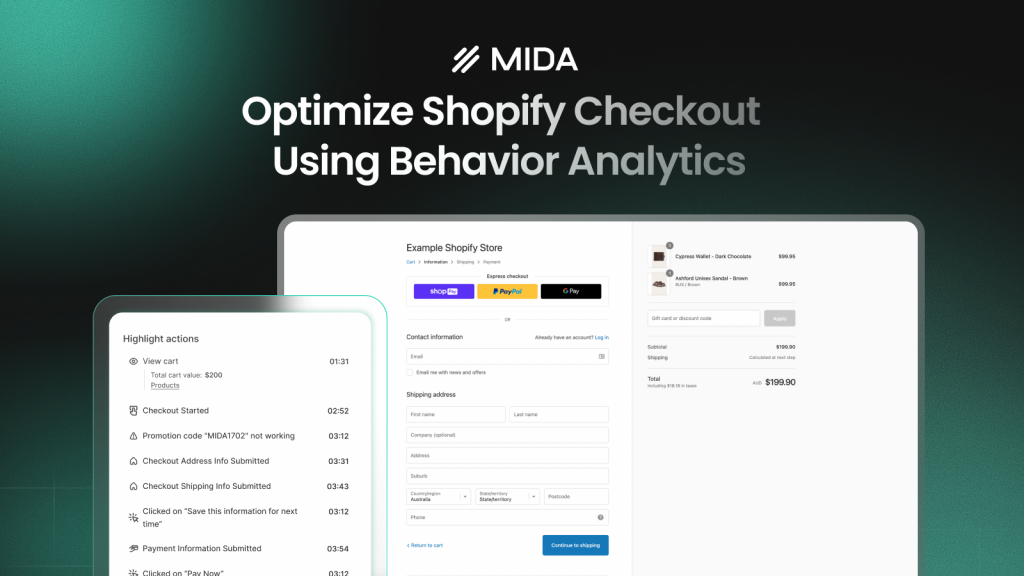
Checkout-specific session recording
Checkout is where most ecommerce revenue is lost—and where many session replay tools fail to capture data. Shopify’s checkout flow has specific technical requirements that generic tools often can’t handle.
MIDA’s session replay is built specifically for Shopify, with checkout-focused recording that captures the complete journey from product page through payment confirmation.
Turn session replay insights into revenue growth
Session replay is only valuable if it leads to action. Start by identifying your highest-impact opportunities—if checkout abandonment is your biggest problem, filter for abandoned checkout sessions and look for patterns.
Then prioritize fixes based on frequency and revenue impact. A bug affecting 5% of checkout sessions is more urgent than a confusing element on a low-traffic page. Session replay helps you make these prioritization decisions with confidence because you’ve seen the actual behavior.
For Shopify merchants, tools like MIDA make this workflow seamless by connecting session replays to heatmaps, analytics, and surveys in a single platform.
FAQs about session replay
How many session recordings should I watch per week?
Most teams watch a curated selection of 20-50 high-priority sessions rather than reviewing everything. Modern session replay tools surface the most relevant recordings automatically through relevance scoring and behavioral filters.
Can session replay tools capture video or embedded media content?
Session replay reconstructs the page structure and user interactions but does not record actual video playback or streaming content within the page. You’ll see that a visitor interacted with a video player, but you won’t see the video content itself.
Does session replay software affect website performance?
Quality session replay scripts are designed to run asynchronously and have minimal impact on page load times or Core Web Vitals.
How long are session recordings typically stored by session replay companies?
Retention periods vary by provider and plan, ranging from a few weeks to several months. Teams with compliance requirements or longer analysis cycles can confirm storage duration before selecting a tool.
Can I share individual session replays with team members or clients?
Most user session replay tools offer sharing features like direct links, tagging, and export options for collaboration with developers, designers, or external stakeholders.
Stop guessing why shoppers leave. Watch real sessions, see exactly where they get stuck, and turn abandoned carts into revenue.


