Mida vs Microsoft Clarity: Complete Feature Comparison for Online Stores
Microsoft Clarity gives you free session replays and heatmaps for any website. Mida connects those same behavior insights directly to your Shopify orders, cart values, and checkout events. The difference sounds subtle until you’re watching a recording and can’t tell whether the visitor purchased or abandoned.
This comparison breaks down how each tool handles session replay, heatmaps, checkout tracking, and Shopify integration—so you can decide which approach fits how you actually optimize your store.
Why Shopify merchants compare Mida and Microsoft Clarity
Both Mida and Microsoft Clarity offer session replays and heatmaps, but they solve different problems. Clarity is a free, general-purpose tool that tracks rage clicks, scroll depth, and basic visitor behavior on any website. Mida takes a Shopify-native approach—it connects behavior data directly to checkout events, order values, and customer profiles.
The choice comes down to what you’re trying to learn. Clarity gives you broad visibility into how visitors interact with your pages without costing anything. Mida shows you which behaviors lead to purchases versus abandoned carts, and it records checkout pages that Clarity can’t access.
If you run a Shopify store and want to understand why shoppers leave without buying, the distinction matters more than the feature lists suggest.
What is Microsoft Clarity
Microsoft Clarity is a free behavior analytics tool that works on any website. It records visitor sessions, generates heatmaps, and uses AI to surface patterns in user behavior automatically.
Free session recordings and heatmaps
Clarity captures unlimited session recordings and heatmaps at no cost—there’s no paid tier or session limit. You can watch visitors navigate your pages, see where they click, and track how far they scroll.
For merchants testing behavior analytics for the first time, Clarity removes the financial barrier entirely. You get real visitor data without committing to a subscription.
AI-powered Copilot and dashboard insights
Clarity’s Copilot feature uses AI to analyze session data and highlight patterns. The dashboard surfaces metrics like dead clicks (clicks on non-interactive elements) and rage clicks (repeated frustrated clicking in the same spot).
The AI summaries help you spot friction without watching hundreds of recordings manually. However, the analysis focuses on general usability rather than ecommerce-specific behaviors like cart abandonment.
Clarity limitations for ecommerce stores
Because Clarity works on any website, it doesn’t integrate with Shopify’s commerce data. Sessions appear as anonymous visitor activity—you can’t tell which recordings belong to customers who purchased versus those who abandoned.
Clarity also can’t record Shopify checkout pages due to platform restrictions. This gap means you lose visibility into the step where many stores see their highest drop-off rates.
What is Mida
Mida is a behavior analytics platform built specifically for Shopify. It connects session replays and heatmaps to your store’s commerce data—orders, cart values, customer profiles, and checkout events appear alongside behavioral insights.
Shopify-native behavior analytics platform
“Shopify-native” means Mida integrates directly with your store admin rather than operating as a separate tool. When you watch a session, you see the customer’s profile, order history, and what happened at checkout—not just anonymous mouse movements.
The integration happens automatically during installation. You don’t configure custom events or build manual connections between analytics and store data.
Revenue-connected replays and heatmaps
Mida ties behavioral data to revenue outcomes. You can filter sessions by:
- Cart value ranges: Watch only sessions from shoppers with $100+ in their cart
- Order status: Compare completed purchases against abandoned checkouts
- Customer type: Separate first-time visitors from returning buyers
Instead of reviewing random sessions, you watch recordings from high-value shoppers who didn’t convert—then see exactly where they hesitated.
Built for checkout and conversion tracking
Mida records checkout pages and tracks funnel drop-offs from product view through successful order. You can identify specific friction points like unexpected shipping costs or confusing form fields.
The platform also includes on-site surveys and AI-powered weekly reports that summarize abandoned cart trends and engagement patterns.
Session replay features compared
Both tools record visitor sessions, but they differ in how you can segment and contextualize recordings.
| Feature | Microsoft Clarity | Mida |
|---|---|---|
| Recording quality | Standard | Smooth, Fast, High Quality |
| Visitor segmentation | Basic (device, location) | Ecommerce-focused (cart value, order status, customer type) |
| Commerce context | None | Order value, customer profile, purchase history |
| Checkout recording | Not available | Available |
Microsoft Clarity provides basic session recording functionality, and when it works, users appreciate the visibility: “you can see exactly the movements of the people inside your web” and it helps eliminate guesswork about customer behavior. The problem is reliability. Multiple merchants report that recordings frequently fail to load, display blank screens, or show completely broken layouts: “The recordings are not usable. The store layout is completely messed up.” Mobile recordings are particularly problematic, with users experiencing “broken recordings on mobile” and sessions that “freeze and close” on smartphones.
Even when recordings do load, rendering issues create confusion. Several users note that recordings show “overlayed on really old screens… promotion from several weeks ago,” meaning you’re watching customer behavior on outdated page versions that don’t reflect your current store. One merchant summarized the core issue: “this app essentially does not work at all. Sometimes it has recordings or heatmaps but often it doesn’t load anything… obviously this has caused some unnecessary stress.”
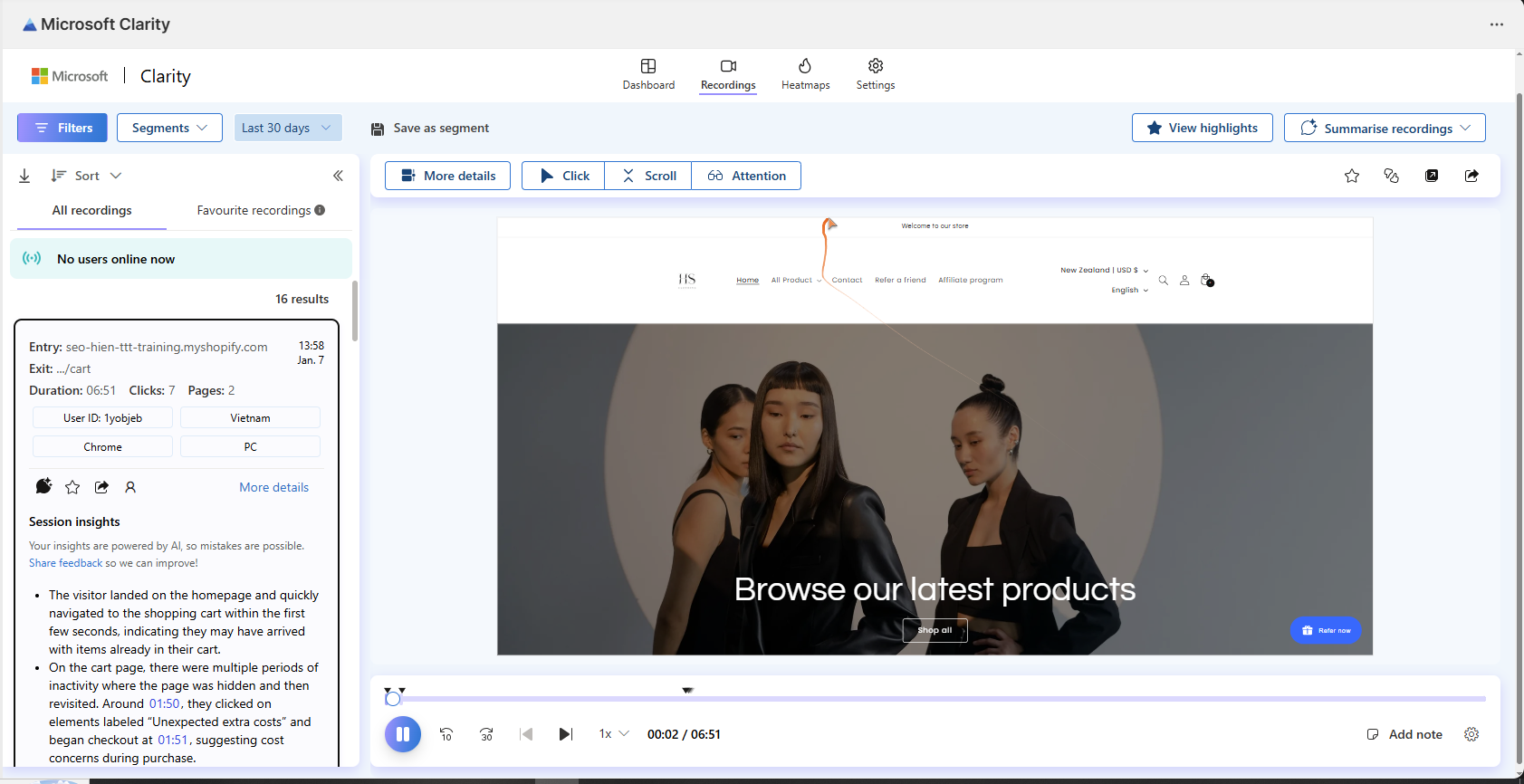
Mida’s session replay is built exclusively for Shopify, which means recordings capture Shopify-specific context that generic tools miss. You see customer profiles, cart values, and order outcomes directly in each recording. When you’re watching a session, you know immediately whether this visitor made a purchase, abandoned their cart, or bounced—and you can filter your recording library by these outcomes.
This ecommerce context matters when you’re prioritizing which sessions to watch. Mida’s Relevance Score surfaces the most important recordings first—high-value carts that abandoned, frustrated visitors with rage clicks, or first-time customers who bounced. You’re not sifting through hundreds of random sessions hoping to find something useful. You’re watching the journeys that directly impact revenue.
Mida also records checkout sessions regardless of your Shopify plan tier, giving you visibility into the step where most revenue is lost. You see exactly where shoppers hesitate—unexpected shipping costs, complex forms, or security concerns—so you can remove the specific friction points that cause abandonment.

Heatmap capabilities in Mida vs Clarity
Heatmaps show you where attention goes on each page—which elements attract clicks, how far shoppers scroll, and where cursor movement reveals hesitation or confusion.
Clarity offers click, scroll, and movement heatmaps, which users find valuable when they work properly. However, the tool struggles with dynamic Shopify elements. Multiple merchants report that heatmaps fail to accurately capture popups, filters, and modal windows: “not great at second layers like filters, pop ups ect.” and “heatmap only shows the pop-up window… actual page is not visible.” This limitation means you’re missing critical interaction data on common Shopify UI patterns like quick-view modals, cart drawers, and filter panels.
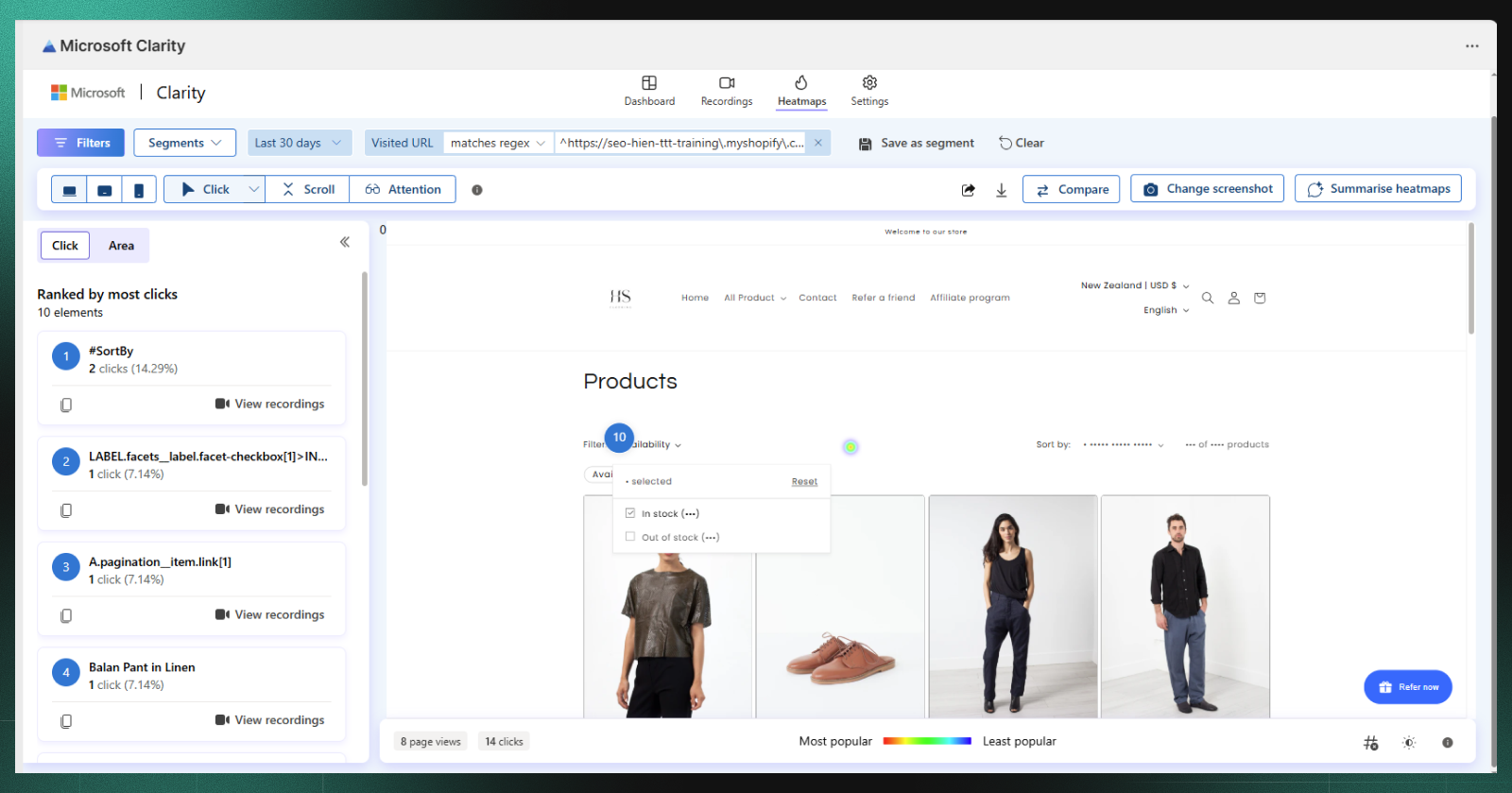
Mida provides click, movement, and scroll heatmaps with element-level precision. You see click-through rates for individual buttons, images, and sections—not just general heat patterns. The tool automatically captures rage clicks (repeated frustrated clicking), dead clicks (clicks on non-interactive elements), and error clicks, giving you specific signals about where the interface confuses or frustrates shoppers.
More importantly, Mida connects heatmaps directly to session recordings. When you see an interesting pattern in a heatmap—high clicks on a non-linked image, or unexpected drop-off at a specific scroll depth—you can click through to watch the actual sessions where that behavior occurred. This connection between aggregate patterns and individual journeys means you understand not just what happened, but why.

How each tool tracks Shopify checkout behavior
Checkout visibility represents the most significant difference between Mida and Clarity for ecommerce optimization.
Checkout page visibility
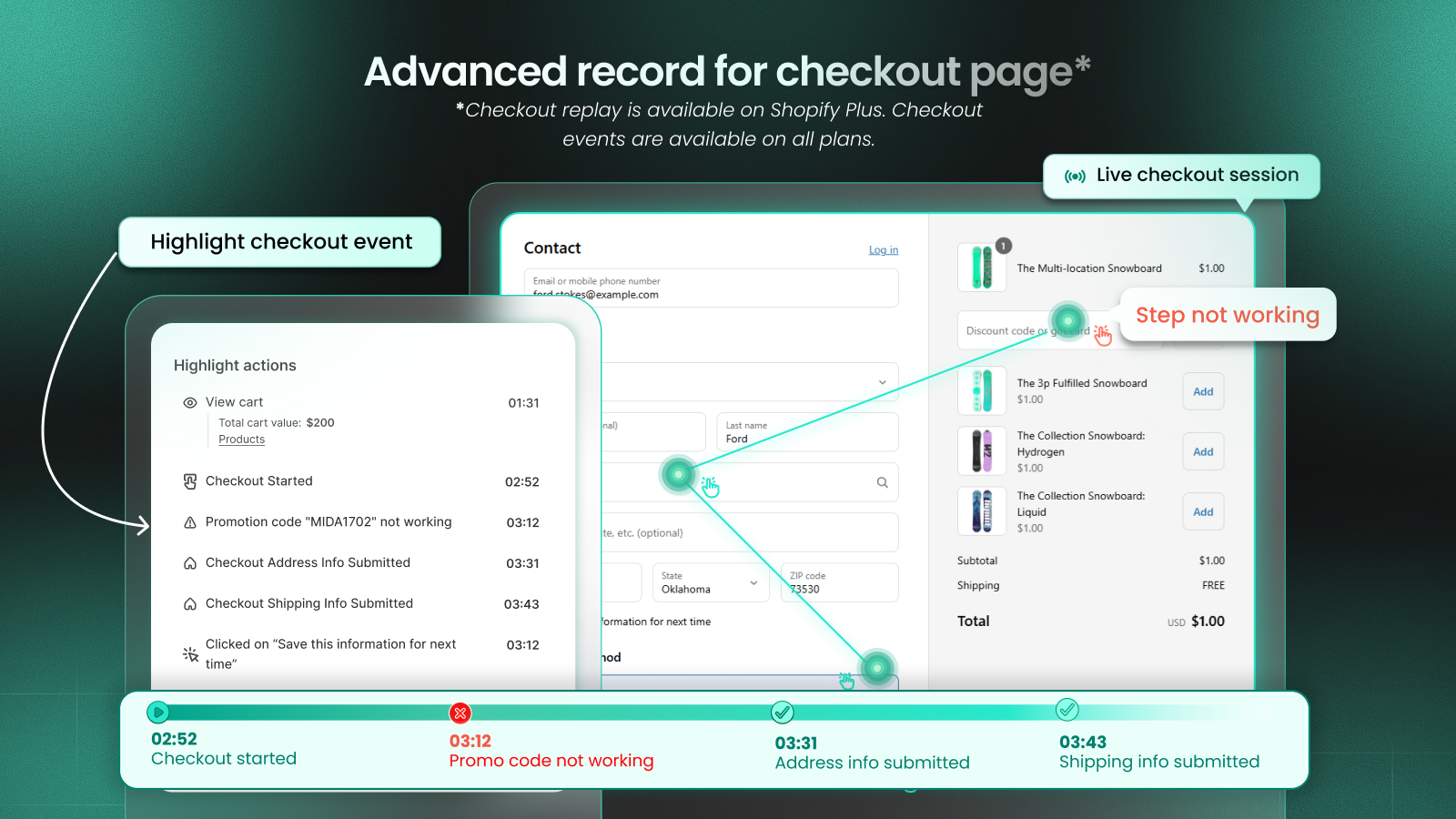
Clarity can’t record Shopify checkout pages. Shopify’s checkout runs on a separate, secured domain that third-party scripts can’t access without native integration.
Mida records checkout behavior because it’s built specifically for Shopify’s architecture. You can watch shoppers fill out forms, react to shipping costs, and either complete or abandon their purchase.
Abandoned cart and order event tracking
Mida tracks abandoned cart and abandoned checkout as filterable events. You can create a view showing only sessions from shoppers who added items but left without purchasing—then watch those recordings to identify patterns.
Clarity has no awareness of cart or order events. A session that ended in a $500 purchase looks identical to one that ended in abandonment.
Customer profile and purchase history access
Mida connects each session to Shopify customer data, including past orders and lifetime value. When you watch a recording, you see whether the visitor is a first-time shopper or a repeat customer.
This context changes how you interpret behavior. A returning customer who abandons checkout might indicate a different problem than a first-time visitor who leaves.
Survey and feedback tools
Qualitative feedback explains the “why” behind behavioral patterns.
On-site survey options
Mida includes targeted on-site surveys you can trigger on specific pages, devices, or after particular actions. You might ask checkout abandoners why they didn’t complete their purchase, or survey customers immediately after a successful order.
Clarity doesn’t include any survey or feedback collection features.
Linking feedback to session recordings
In Mida, you can click “Play” on any survey response to watch the exact session where that feedback was submitted. If a customer writes “I couldn’t find the size chart,” you can watch their session and see exactly where they looked.
This connection between qualitative feedback and behavioral evidence removes guesswork about what customers mean when they describe problems.
Shopify integration and setup
Both tools install through the Shopify App Store, but they differ in how deeply they integrate with your store’s data.
Clarity is platform-agnostic by design. While this flexibility works for some use cases, it creates limitations for Shopify merchants. Users report that they “can not connect Google Analytics or Google Ads account” from within the Shopify app, and there’s no native integration with Shopify customer profiles, order data, or checkout events. You’re seeing behavioral data in isolation from the commerce context that makes it actionable.
Internal traffic filtering requires a separate Microsoft account login, adding friction to a basic setup task: “can’t exclude visitors by IP without logging in to another MS account.” One merchant noted that “my logins are visible. they should not be visible,” indicating that basic ecommerce use cases aren’t well supported.
Mida is built exclusively for Shopify, which means every feature is designed around Shopify’s data model. Session recordings automatically include customer profiles, cart values, and order outcomes. You can filter recordings by Shopify-specific segments: first-time vs. returning customers, abandoned checkout vs. completed purchase, high-value carts, specific product viewers.
This deep integration extends to checkout visibility—Mida records checkout sessions regardless of your Shopify plan tier, giving you complete visibility into the step where most revenue is won or lost. You see form interactions, shipping calculation moments, and payment method selections, so you can identify and fix the specific friction points that cause abandonment.
Customer support
When you encounter a bug, have a question about data interpretation, or need help with advanced features, responsive support determines whether you can continue your work or hit a dead end.
Clarity users report poor support experiences. One merchant stated: “Have gotten no respons from customer service. There are a lot of bugs.” Another described a broken promise: “Terrible service, couldn’t connect to the project. They promised to send an email, but they didn’t send one at all.” The lack of support is particularly problematic given the frequency of technical issues users encounter.
Documentation is also inadequate. One user noted that “YouTube videos were outdated,” and multiple merchants report confusion about basic functionality without clear in-app guidance or contextual help.
Mida provides responsive support that helps you interpret behavior data and prioritize improvements. When you’re unsure whether a pattern you’re seeing represents a real problem or normal variation, support can help you understand the context and decide on next steps. Documentation is maintained and accurate, and in-app guidance helps you understand metrics and features without leaving your workflow.
How Mida and Microsoft Clarity pricing compare
Cost structure differs dramatically between Mida and Clarity.
Microsoft Clarity free plan details
Clarity is completely free with unlimited sessions and heatmaps. There are no paid tiers, session caps, or feature restrictions. Microsoft uses anonymized data to improve their AI models.
For merchants who want basic behavior visibility without cost, Clarity delivers substantial value.
Mida free plan and paid tiers
Mida offers a free plan with core features including session replays, heatmaps, and basic analytics. Paid tiers scale with session volume and unlock advanced features like extended data retention.
The pricing reflects Mida’s deeper ecommerce functionality—checkout tracking, revenue-connected insights, and integrated surveys that Clarity doesn’t offer.
Which tool is best for your Shopify store
Microsoft Clarity’s free pricing makes it an attractive option in theory. When it works, users appreciate the basic visibility into customer behavior that session recordings and heatmaps provide. However, the gap between theoretical value and practical reliability is significant.
The core problem isn’t that Clarity lacks features—it’s that the features it has don’t work consistently for Shopify merchants. Recordings fail to load, mobile sessions break, heatmaps don’t render dynamic elements correctly, and authentication issues block access entirely. Feature parity gaps force you to switch between the Shopify app and web portal, and critical ecommerce capabilities like checkout tracking and funnel visualization are incomplete or missing.
When you’re accountable for conversion performance, unreliable data is worse than no data. Making optimization decisions based on broken recordings or incomplete funnels leads to wasted development time and missed revenue opportunities. The time cost of working around tool limitations and the opportunity cost of delayed insights far exceed any savings from a free price tag.
Mida is purpose-built for Shopify merchants who need reliable, actionable behavior insights. Every feature—from session recording to heatmaps to funnel visualization—is designed around Shopify’s commerce flows and data structures. You get checkout visibility regardless of plan tier, accurate mobile recordings, element-level interaction data, and tight integration with customer profiles and order outcomes.
More importantly, Mida works consistently. Recordings load quickly and render accurately. Heatmaps capture dynamic elements correctly. Filters and segments reflect real Shopify commerce patterns. When you watch an abandoned checkout session, you’re seeing the actual current experience, not an outdated overlay. This reliability means you can confidently base optimization decisions on what you observe.
The combination of reliability, Shopify-native integration, and ecommerce-specific features means you move faster from question to insight to action. When you see high checkout abandonment, you can filter to those sessions, watch what happened, identify the specific friction point, and ship a fix—all in the same day. That speed and confidence in your data translates directly to revenue impact.
Finally, your choice depends on what questions you’re trying to answer.
- Choose Microsoft Clarity if: You want free, basic behavior visibility without ecommerce-specific insights, you’re testing behavior analytics for the first time, or you run a non-Shopify website alongside your store
- Choose Mida if: You want to connect behavior directly to revenue outcomes, you want checkout page visibility, you want to filter sessions by cart value or order status, or you want integrated surveys with session replay context
For Shopify merchants focused on conversion optimization, Mida’s commerce-connected approach typically delivers more actionable insights than Clarity’s general-purpose analytics.
Try Mida free to see how Shopify-native behavior analytics connects sessions to orders, customers, and checkout events.
Frequently asked questions about Mida and Microsoft Clarity
Is Microsoft Clarity completely free for Shopify stores?
Yes, Microsoft Clarity is completely free with no paid tiers—you get unlimited session recordings and heatmaps at no cost, though it lacks Shopify-specific features like checkout tracking and order data.
Can you use Mida and Microsoft Clarity together on the same store?
Yes, you can run both tools simultaneously since they operate independently. Most Shopify merchants find Mida’s commerce-connected insights eliminate the need for a second behavior tool.
Does Microsoft Clarity record Shopify checkout pages?
No, Microsoft Clarity can’t record Shopify checkout pages due to platform limitations. You lose visibility into the step where many stores experience their highest drop-off rates.
Which behavior analytics tool provides more accurate ecommerce tracking?
Mida provides more accurate ecommerce tracking because it connects directly to Shopify data—linking sessions to actual orders, cart values, and customer profiles rather than treating visitors as anonymous.
How long does it take to set up Microsoft Clarity or Mida on Shopify?
Both tools install in minutes through the Shopify App Store. Mida begins capturing Shopify-specific data immediately, while Clarity requires additional configuration for basic tracking.


