How to Reduce Shopify Bounce Rate in 2026: 12 Proven Strategies
Your ads are driving traffic, but visitors leave before they even scroll. That’s bounce rate in action—and on Shopify stores, it’s one of the clearest signals that something between your marketing and your product pages isn’t connecting.
This guide covers what bounce rate actually measures, what benchmarks matter for ecommerce, how to diagnose the specific issues causing visitors to leave, and 12 proven strategies to keep more shoppers engaged long enough to convert.
What is bounce rate on Shopify
A good Shopify bounce rate for ecommerce typically falls between 20% and 45%, with rates above 55% signaling that improvements are likely needed. Bounce rate measures the percentage of visitors who land on your store and leave after viewing only one page without taking any action. No clicks, no add-to-cart, no navigation to another page.
Shopify calculates bounce rate by dividing single-page sessions by total sessions. If 100 people visit your product page and 40 leave without doing anything else, your bounce rate for that page is 40%.
One common point of confusion: bounce rate and exit rate are different metrics. Exit rate measures the percentage of visitors who leave from a specific page, regardless of how many other pages they viewed first. A high exit rate on your order confirmation page is perfectly normal. A high bounce rate on your homepage, on the other hand, is a red flag worth investigating.
Why bounce rate matters for Shopify conversions
A high bounce rate directly impacts your store’s revenue because every bouncing visitor represents a missed opportunity. Visitors who leave immediately never see your product benefits, reviews, or offers.
The financial impact compounds quickly:
- Lost sales opportunities: Visitors who bounce are gone before your store has a chance to convert them.
- Wasted marketing spend: If you’re paying for traffic through ads, high bounce rates mean you’re paying for visitors who leave immediately. Your customer acquisition cost rises while your return on ad spend drops.
- Indirect SEO effects: While bounce rate itself isn’t a direct Google ranking factor, the underlying issues that cause bounces—slow load times, poor mobile experience, thin content—do affect search visibility.
What is a good bounce rate for ecommerce stores
There’s no universal “good” bounce rate because the ideal number depends heavily on context. A blog post naturally has a higher bounce rate than a product page. Paid social traffic bounces more than email traffic. Your industry matters too.
Rather than chasing a single number, focus on benchmarks for your specific situation and track improvement over time.
Average ecommerce bounce rate benchmarks
Different page types serve different purposes, which means they have different expected bounce rates:
| Page Type | Typical Bounce Rate |
| Homepage | 20% – 40% |
| Product pages | 30% – 50% |
| Collection pages | 25% – 45% |
| Blog posts | 65% – 90% |
| Landing pages (paid ads) | 60% – 90% |
A 70% bounce rate on a blog post might be fine—visitors found their answer and left. That same rate on a product page suggests serious friction.
Shopify bounce rate by industry
Performance varies significantly across ecommerce verticals. Fashion and apparel stores typically see bounce rates between 40% and 60%. Beauty and cosmetics tend to run slightly lower, from 35% to 55%. Electronics stores often fall in the 35% to 60% range.
Your own historical data matters more than industry averages, though. If your bounce rate was 50% last month and it’s 60% this month, something changed—and that’s worth investigating regardless of what other stores experience.
Bounce rate by traffic source
Where visitors come from dramatically affects how they behave. Email subscribers already know your brand, with email bounce rates at 54% compared to nearly 64% for social traffic. Paid social traffic often bounces more because visitors may have been casually scrolling rather than actively shopping.
Organic search traffic falls somewhere in between, depending on how well your page matches the searcher’s intent. Direct traffic—people who typed your URL—usually shows the lowest bounce rates because they came with purpose.
How to check bounce rate on Shopify
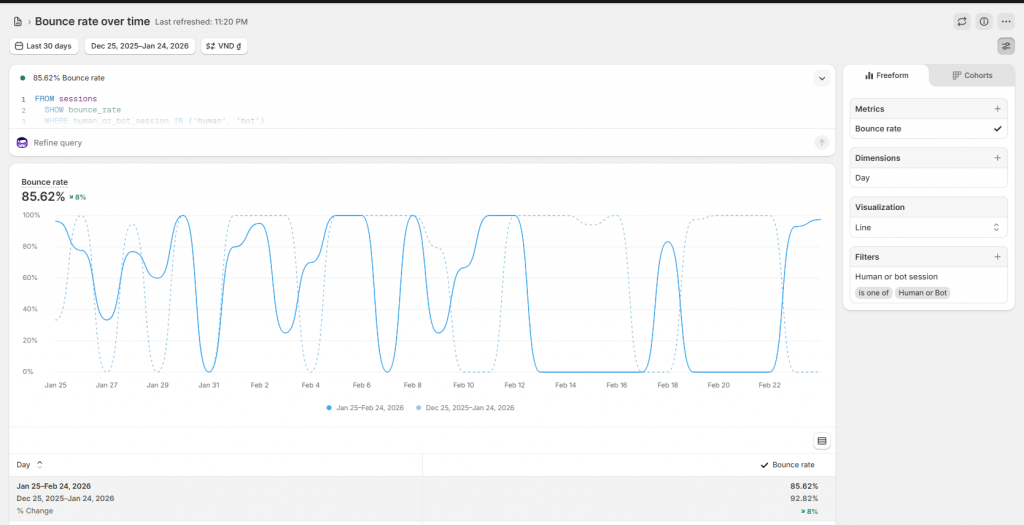
Finding your bounce rate in Shopify takes just a few clicks. From your admin dashboard, navigate to Analytics, then Reports. Under the Acquisition section, look for the Sessions report, which displays bounce rate alongside other session metrics.
Shopify’s native reports have limitations, however. You can see overall bounce rate, but drilling into specific pages, traffic segments, or device types requires more advanced tools. For granular analysis—like comparing bounce rates between mobile and desktop on a specific product page—a dedicated analytics platform provides page-level and segment-level data that Shopify’s built-in reports don’t offer.
Common causes of high bounce rate on Shopify stores
Before implementing fixes, diagnosing what’s actually causing visitors to leave is essential. A high bounce rate is a symptom, and the issues below are often the underlying cause.
Slow page load times
Modern shoppers are impatient. If a page takes more than four seconds to load, 63% of visitors will bounce before seeing any content.
Common culprits include unoptimized images that are larger than necessary, too many third-party apps adding scripts to your pages, and bloated themes with features you don’t use. Each additional app and each oversized image adds milliseconds that compound into seconds.
Poor mobile experience
Over 62% of ecommerce traffic now comes from mobile devices. If your store looks great on desktop but requires pinching and zooming on a phone, you’re frustrating most of your visitors.
Unresponsive designs, tiny tap targets, and navigation menus that don’t work well on small screens all drive mobile bounces. Even if your theme is technically “responsive,” the mobile experience might still be clunky enough to push visitors away.
Mismatched content and visitor intent
When your ad promises one thing and your landing page delivers another, visitors feel misled. They clicked expecting a specific product, offer, or answer—and when they don’t find it immediately, they leave.
This mismatch happens frequently with paid campaigns. Your Facebook ad shows a specific dress, but the link goes to a general collection page. The visitor has to hunt for what they saw, and most won’t bother.
Confusing navigation and site structure
If visitors can’t easily find what they’re looking for, they won’t stick around to figure it out. Unclear menu labels, buried product categories, and poor search functionality all create friction.
Think about your navigation from a first-time visitor’s perspective. Do your category names make sense to someone unfamiliar with your brand? Can they find products in three clicks or fewer?
Missing trust signals
New visitors are naturally skeptical, especially with stores they’ve never heard of. Without trust signals—customer reviews, security badges, clear return policies, professional design—they hesitate. And hesitation often leads to bouncing.
This is particularly true for higher-priced items. The more you’re asking someone to spend, the more reassurance they want before committing.
Technical errors and broken elements
Nothing drives visitors away faster than a broken website. 404 error pages from dead links, buttons that don’t respond, images that fail to load, and JavaScript errors that prevent page functionality all create immediate friction.
Store owners often don’t notice these issues because they don’t experience them during normal browsing. But visitors arriving from specific links or using certain browsers might encounter problems you’ve never seen.
How to use behavioral analytics to find bounce issues
Quantitative metrics tell you what is happening—your bounce rate is 65%. Behavioral analytics tell you why—visitors are rage-clicking on an image they expect to be clickable, or they’re scrolling past your add-to-cart button without seeing it.
This distinction matters because you can’t fix what you don’t understand. Lowering bounce rate requires identifying specific friction points, not just knowing the number is too high.
Session replays for visitor journey analysis
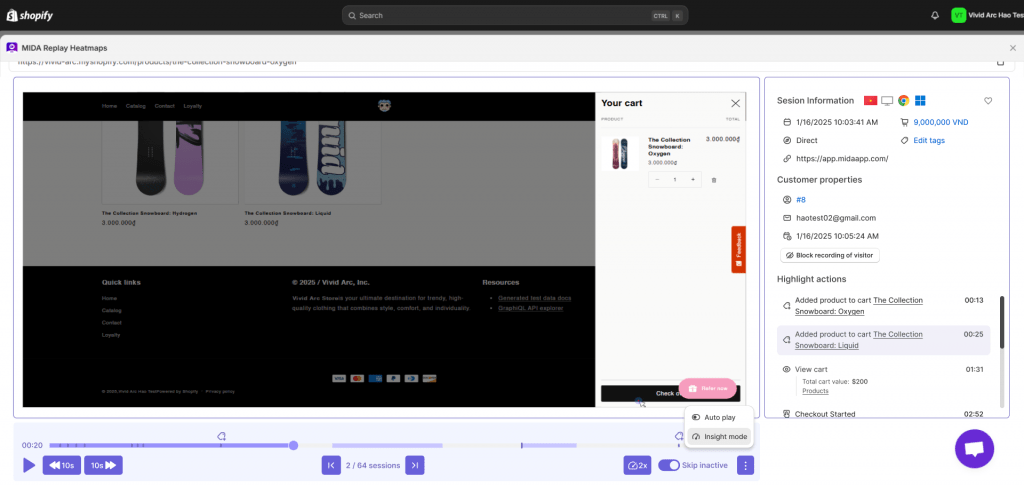
Session replays are recordings of real visitor sessions on your store. You watch exactly what a visitor did: where they moved their cursor, what they clicked, where they hesitated, and when they decided to leave.
Session replays reveal patterns you’d never spot in aggregate data. Maybe visitors consistently pause at your shipping information, suggesting confusion or concern. Maybe they scroll up and down repeatedly, looking for something they can’t find. Tools like MIDA Session Replay add commerce context to recordings—cart value, checkout steps, order outcomes—so you can prioritize the sessions that represent the most revenue impact.
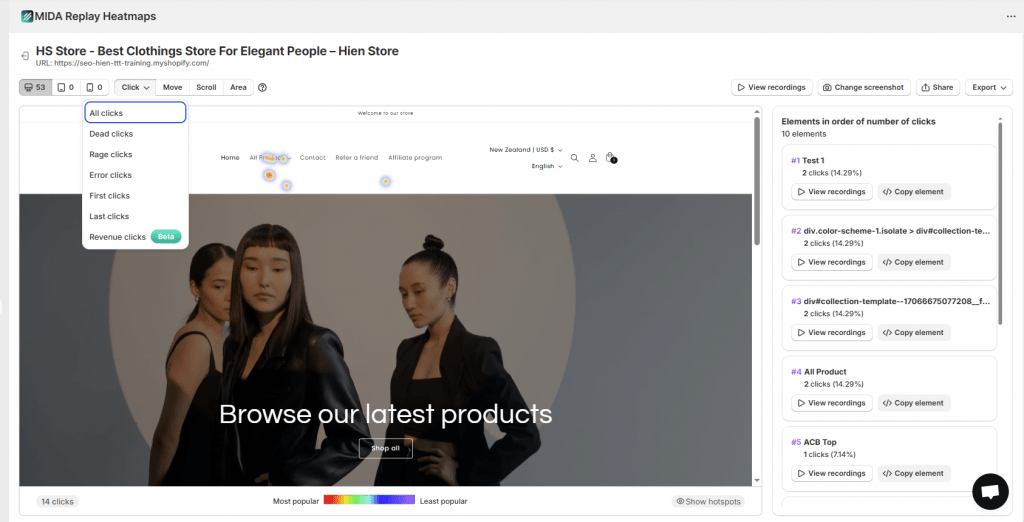
Heatmaps for page engagement insights
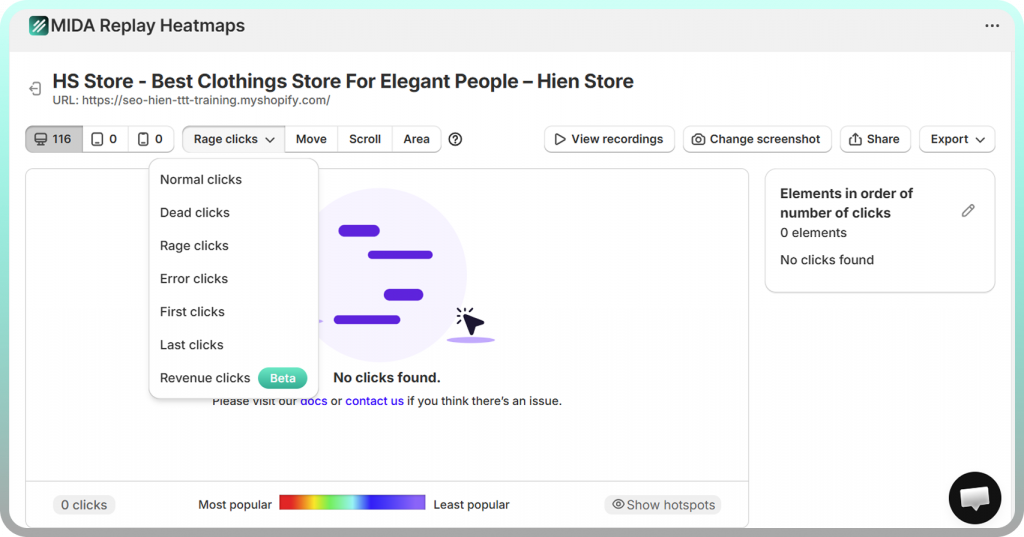
Heatmaps visualize aggregate behavior across many visitors. Click maps show where people are clicking (and where they’re clicking on non-clickable elements). Scroll maps reveal how far down the page visitors actually go.
Heatmap data answers critical questions: Are visitors seeing your product reviews below the fold? Is your add-to-cart button getting attention? Are people clicking on images expecting them to do something? Revenue-aware heatmap tools can connect interactions to actual orders, showing you which elements drive sales versus which just get clicks.
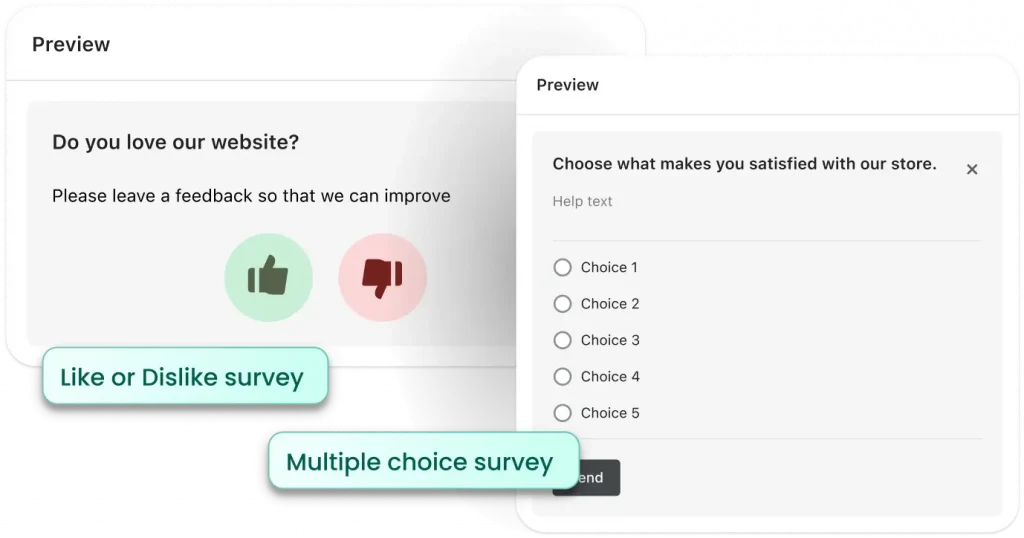
On-site surveys for direct customer feedback
Sometimes the fastest way to understand why visitors leave is to ask them. Targeted on-site surveys can appear when a visitor shows exit intent, asking a simple question like “What stopped you from making a purchase today?”
Survey responses often reveal issues you’d never guess from behavioral data alone—concerns about product quality, missing size information, shipping costs that seem too high. When survey responses connect to session recordings, you get the complete picture: what visitors said and what they did.
12 proven strategies to reduce Shopify bounce rate
The tactics below address the most common bounce causes. Prioritize based on the specific issues you’ve identified in your own store rather than implementing everything at once.
1. Improve page speed and Core Web Vitals
Start with images—compress them using tools like TinyPNG or Shopify’s built-in optimization. Audit your installed apps and remove any you’re not actively using, since each adds scripts that slow your pages. Implement lazy loading so images and videos below the fold don’t load until visitors scroll to them.
Google’s Core Web Vitals metrics provide specific targets: Largest Contentful Paint (how quickly your main content loads), First Input Delay (how quickly your page responds to interaction), and Cumulative Layout Shift (how much your page layout moves during loading).
2. Optimize for mobile shoppers
Test your store on actual mobile devices, not just browser preview modes. Ensure buttons and links are large enough to tap accurately with a thumb. Make sure text is readable without zooming.
Simplify your mobile navigation. A hamburger menu with clear, concise categories works better than trying to replicate your desktop navigation on a small screen.
3. Match landing page content to traffic source intent
Create dedicated landing pages for your ad campaigns that align perfectly with your ad creative. If your ad shows a specific product, link directly to that product page—not a collection page where visitors have to search.
For organic traffic, ensure your page content delivers on the promise of your meta title and description. If someone searches “waterproof hiking boots” and clicks your result, they expect to see waterproof hiking boots immediately.
4. Simplify navigation and collection page structure
Use category labels that your customers would use, not internal jargon. Create a logical hierarchy that visitors can understand intuitively. Add visible breadcrumbs so users always know where they are and can easily navigate back.
Limit menu depth to prevent visitors from getting lost in too many sub-categories. If finding a product requires more than three clicks from your homepage, consider restructuring.
5. Improve site search functionality
Implement search with autocomplete suggestions, typo tolerance, and robust filtering options. When someone searches “blue dress size medium,” they expect relevant results—not a message saying no products match.
Make your search bar prominent and easy to find. Many visitors prefer searching directly rather than navigating through categories, especially on mobile devices.
6. Create clear and compelling CTAs
Your primary call-to-action buttons—”Add to Cart,” “Buy Now,” “Shop Collection”—benefit from standing out visually. Use contrasting colors that draw the eye. Use action-oriented language that tells visitors exactly what happens when they click.
Place key CTAs above the fold so visitors see them without scrolling. On longer pages, repeat them strategically so visitors don’t have to scroll back up when they’re ready to act.
7. Add social proof and customer reviews
Display star ratings and written reviews directly on product pages. Showcase user-generated content from social media. Weave testimonials throughout your site, including the homepage and checkout process.
Reviews are particularly powerful for reducing bounces because they answer questions visitors have before they ask. Seeing that other customers were satisfied reduces hesitation and encourages exploration.
8. Display trust badges and security signals
Prominently display SSL indicators, payment provider logos (Visa, PayPal, etc.), and badges for guarantees or certifications. Place trust signals near your add-to-cart button and throughout checkout.
For first-time visitors, trust signals provide reassurance that your store is legitimate and their payment information will be secure.
9. Show transparent shipping and payment policies
Don’t hide shipping costs until the final checkout step. Display estimated delivery timeframes, return policy summaries, and accepted payment methods clearly on product pages or in a site-wide banner.
Unexpected costs are one of the top reasons for cart abandonment. By being transparent early, you set accurate expectations and reduce the likelihood of visitors bouncing when they discover the full cost later.
10. Offer express checkout options
Enable one-click checkout options like Shop Pay, Apple Pay, and Google Pay. Express checkout reduces friction for visitors who are ready to buy but don’t want to fill out lengthy forms.
Offering guest checkout is equally important. Many first-time visitors won’t create an account just to make a purchase. Forcing registration creates a barrier that causes bounces.
11. Use exit-intent popups strategically
When a visitor’s cursor moves toward the browser’s close button, trigger a popup with a valuable offer—a discount code, free shipping threshold, or email signup incentive. Keep the design clean and the offer relevant.
Be careful not to overuse popups. If visitors encounter multiple popups during a single session, the annoyance can actually increase bounces rather than reduce them.
12. A/B test pages and iterate based on results
A/B testing involves creating two versions of a page element—a headline, button color, image, or layout—and showing each version to different visitors to see which performs better. Test one variable at a time so you know exactly what caused any change in performance.
Use insights from your behavioral analytics to form hypotheses about what to test. If heatmaps show visitors aren’t scrolling to your reviews, test moving them higher on the page.
Reduce bounce rate and grow your Shopify revenue
Reducing bounce rate isn’t a one-time fix—it’s an ongoing process of identifying friction and removing it. The merchants who succeed at this move beyond just tracking metrics and start understanding the human behavior behind them.
By combining quantitative data (your bounce rate numbers) with qualitative behavioral insights (session replays, heatmaps, survey responses), you stop guessing and start knowing exactly where visitors drop off and why. For Shopify merchants ready to take control of their user experience, tools like MIDA provide the visibility to diagnose friction, fix issues, and turn bouncing visitors into customers.
See exactly where shoppers get stuck and why they leave. Watch real sessions, identify friction points, and make changes that increase conversions.
FAQs about Shopify bounce rate
What is the difference between bounce rate and exit rate on Shopify?
Bounce rate measures single-page sessions where visitors leave without any interaction. Exit rate measures the percentage of visitors who leave from a specific page, even if they viewed other pages first. A high bounce rate on a product page signals a problem. A high exit rate on your order confirmation page is completely normal and expected.
Does a high bounce rate always mean there is a problem with my store?
Not necessarily. Context and page purpose matter significantly. A blog post or contact page might naturally have a high bounce rate because visitors arrive, find the information they want, and leave satisfied. The metric’s meaning depends entirely on what the page is supposed to accomplish.
How often should Shopify merchants monitor their bounce rate?
Weekly monitoring works well for most stores to track trends and spot anomalies. During critical periods—major sales events, site redesigns, new ad campaigns—check more frequently to catch and fix issues quickly before they impact significant revenue.
Can Shopify apps and third-party scripts increase bounce rate?
Yes. Every app you install can add code and scripts that slow down page load times. Poorly optimized or conflicting apps can also cause technical errors that frustrate visitors. Regular app audits help ensure you’re only running what’s essential and providing clear value.
Does bounce rate affect SEO rankings for Shopify stores?
Google has stated it doesn’t use bounce rate directly as a ranking factor. However, the user experience issues that cause high bounce rates—slow page speed, poor mobile experience, low-quality content—are ranking factors. Fixing bounce-causing issues improves both user experience and SEO simultaneously.


